

Linked to the job
Link a purchase order to a project and see what was ordered for which job.
 Try it free
Estimates and invoices
EstimatorAdvance invoiceE-invoices (Peppol)Templates, logo and coloursLanguages and currenciesPayments
Sending and e-signatureAutomatic remindersOnline paymentsGoogle reviewsJobs and team
Projects and costsCalendar and plannerTimesheetsPhotos and filesExpenses and reports
Expenses and receipt scanningReports and profitFor your accountantPurchase ordersTeam and support
Team and permissionsEmployees (HRM)Advo AI assistantBooster planPurchase orders
Create a purchase order for materials in a minute: supplier, items, delivery address and date. Link it to the job, and AdBooks numbers it and prepares a PDF for your supplier.
No credit card · Sign up with Google too · Support in your language
Click New purchase order and pick a supplier, or add one on the spot with New supplier.
Enter description, quantity, unit, price and VAT, plus the delivery address and date. The total adds up by itself.
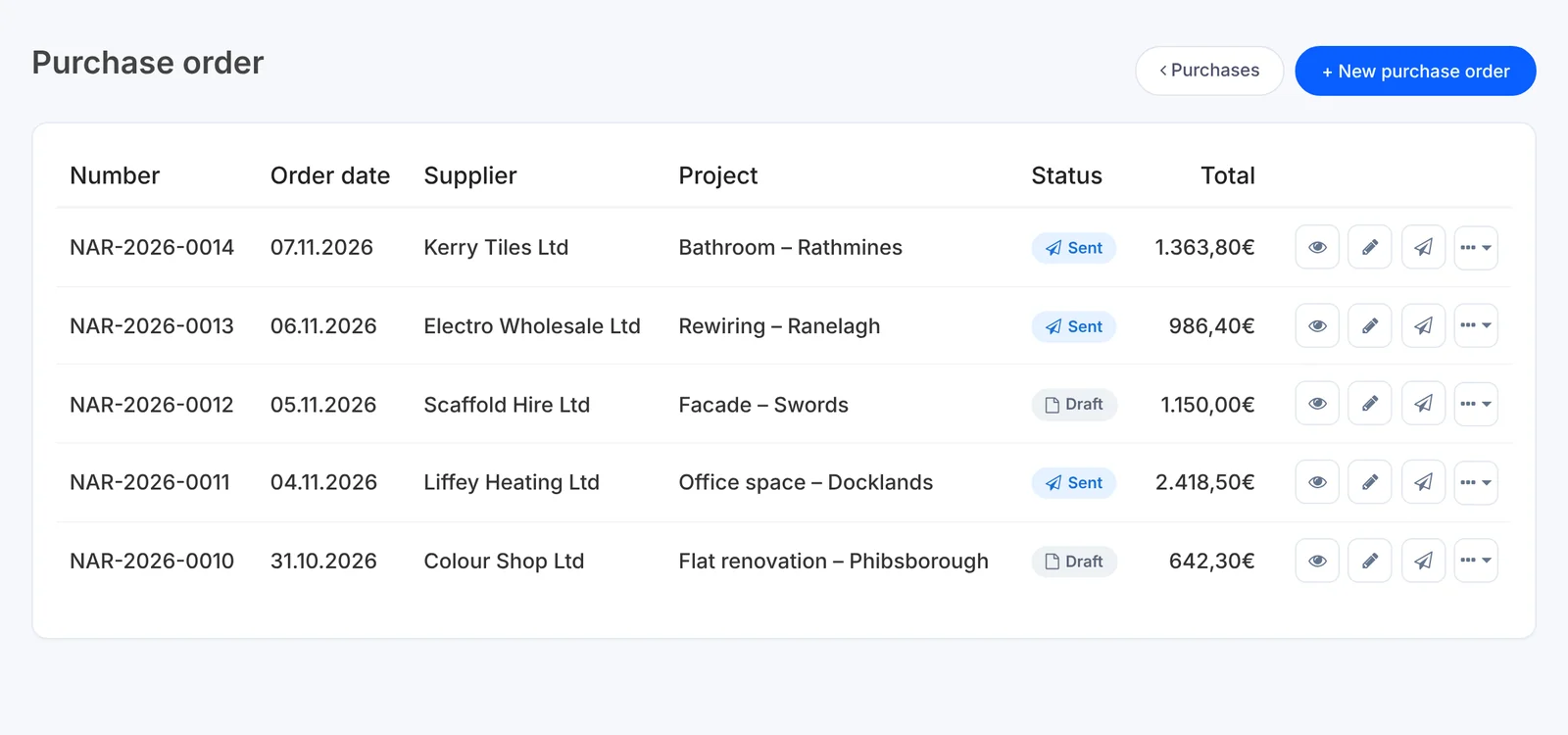
The order gets its own number, e.g. NAR-2026-0014, and you download the PDF or send it to the supplier.
Plans: Purchase orders are included in every plan.See prices →
No messages lost in your phone and no guessing who ordered what for which site.
Link a purchase order to a project and see what was ordered for which job.
The list shows number, date, supplier, project, status (draft or sent) and amount.
Put the delivery address and date on the order so the materials arrive where they are needed.
Orders, supplier bills and expenses sit together under Purchases, next to profit per project.
Choose the plan that fits your pace. 14 days with everything included, then you decide.
How many people use AdBooks in your company?
With yearly billing you get 2 months free and save up to €104 a year.
For solo tradespeople and small businesses.
You pay €199 once a year, excl. VAT
Estimates and invoices without unnecessary paperwork.
Included
For companies with a crew, projects and several jobs at once.
You pay €399 once a year, excl. VAT
Projects, crew and expenses connected in one place.
Everything in Pro, plus
For companies that want more than software.
You pay €699 once a year, excl. VAT
Besides the software you also get a website, a logo and personal support.
With Booster you also get, at no extra cost:
Everything in Growth, plus
| Feature | Pro | Growth | Booster |
|---|---|---|---|
| Invoicing and e-invoicing | |||
| Invoices, estimates and customers | Unlimited | Unlimited | Unlimited |
| E-invoices in supported formats | |||
| Estimate to invoice | |||
| Online client signature on estimates and invoices | |||
| Online invoice payment (Stripe cards / PayPal) | |||
| Automatic reminders for unpaid invoices (3 levels) | |||
| All invoices for a period to a customer in one click | — | ||
| Invoice templates | 8 | 12 | 12 |
| Projects and sites | |||
| Projects | Up to 3 | Unlimited | Unlimited |
| Tasks, calendar and notes inside a project | |||
| Tasks, calendar and notes outside projects | — | ||
| Work hours per worker (inside a project) | |||
| Site photos attached to the project | |||
| Voice text input | — | ||
| Expenses and profit | |||
| Manual expense entry | |||
| Automatic receipt scanning (expenses) | — | ||
| Expenses per site and supplier purchase orders | |||
| Profit and margin per project | |||
| Estimator - product and item database for estimates and invoices | — | ||
| Accountant | |||
| Export of invoices, estimates and credit notes (PDF + Excel) | |||
| Automatic sending to your accountant every month | — | ||
| Team | |||
| People with access | 1 (just you) | 3 | 5 |
| Extra person | — | €9/mo or €90/yr | €9/mo or €90/yr |
| Staff records (HRM) | — | — | |
| Customers and reputation | |||
| Email notifications (overdue invoices, appointments, plan expiry) | |||
| Push notifications on phone and computer | |||
| Google review requests (manual and automatic) | — | ||
| Company visibility | |||
| Website with domain | — | — | |
| Logo design | — | — | |
| 250 business cards | — | — | |
| 2 site signs | — | — | |
| Basic SEO setup | — | — | |
| Business email address (info@yourcompany.com) | — | — | |
| AI and support | |||
| Advo AI assistant | — | Higher limit | |
| Support | |||
| Personal adviser and faster replies | — | — | |
Prices are in euros and exclude VAT. Booster is billed yearly only. Extra person on Growth and Booster: €9 per month or €90 per year.
Create a purchase order for materials in a minute: supplier, items, delivery address and date. Link it to the job, and AdBooks numbers it and prepares a PDF for your supplier.
A document you use to order goods or materials from a supplier: what, how much, at what price and when it should be delivered.
In the Purchases menu, click Purchase order. You will find every order there with its number, date, supplier, project, status and amount.
Yes. In the order form, click New supplier and carry on without leaving the order.
No. Pick a project when the materials are for a specific job, otherwise leave it without one.

We build AdBooks for people who work with their hands and their heads, so that an estimate, an advance and an invoice are done in a few minutes. If something isn't working for you, message me directly.

Other features
AdBooks for your trade