

Left or right
Left window (DIN 5008) for Germany, Austria and South-East Europe, right window for France, Switzerland, Belgium and Luxembourg.
 Try it free
Estimates and invoices
EstimatorAdvance invoiceE-invoices (Peppol)Window envelopeTerms and conditionsTemplates, logo and coloursLanguages and currenciesPayments
Sending and e-signatureAutomatic remindersOnline paymentsLump-sum estimate and depositAll invoices for a periodGoogle reviewsJobs and team
Projects and costsCalendar and plannerTimesheetsJobs and work ordersPhotos and filesExpenses and reports
Expenses and receipt scanningReports and profitFor your accountantPurchase ordersTeam and support
Team and permissionsEmployees (HRM)Advo AI assistantBooster planWindow envelope
AdBooks places the customer address exactly in the envelope window: on the left (DIN 5008) or on the right, as is usual in France, Switzerland, Belgium and Luxembourg. No labels, no handwritten addresses.
No credit card · Sign up with Google too · Support in your language
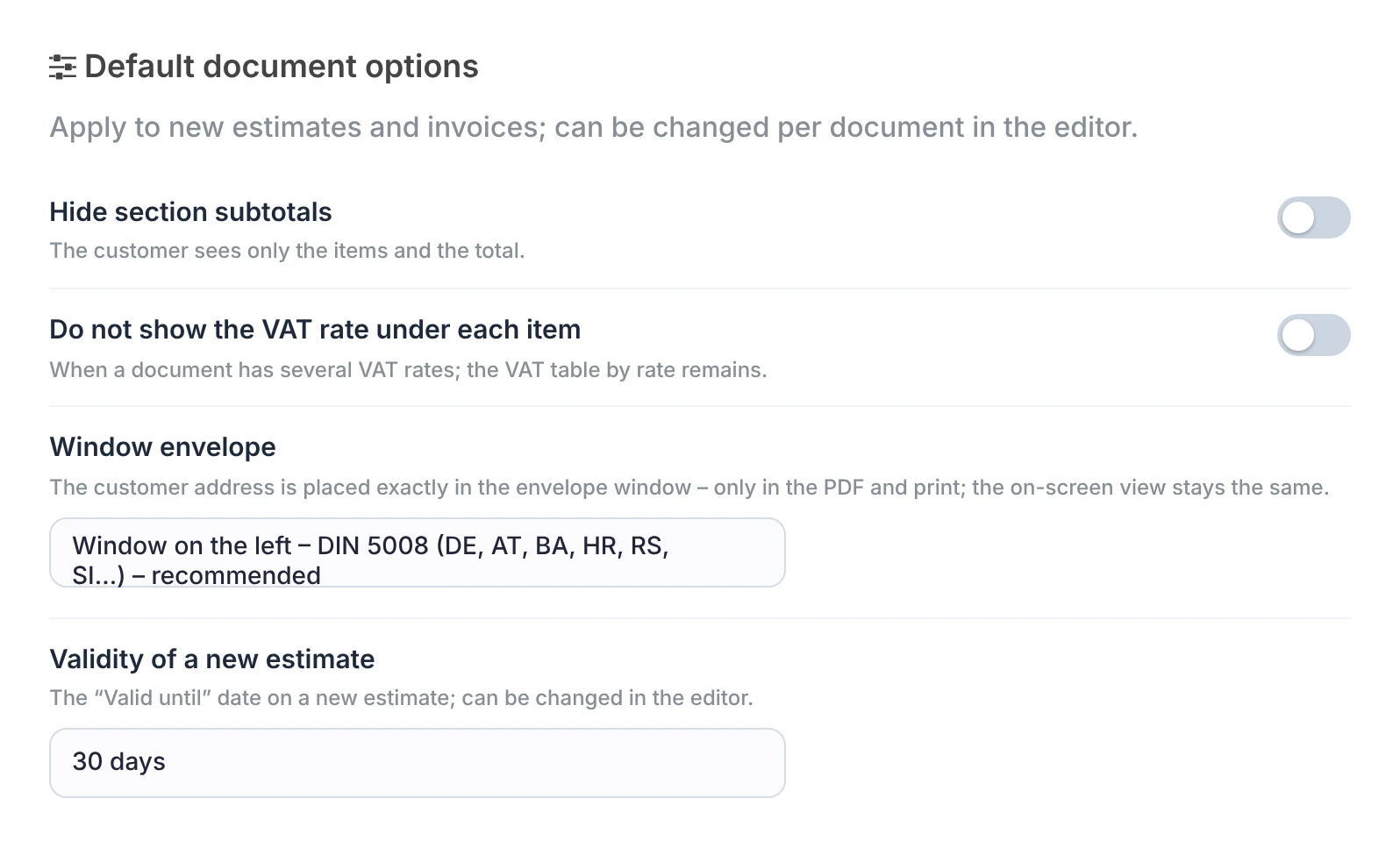
In the template settings, under Default document options, choose the window on the left (DIN 5008) or on the right. Once, for every document.
Work as usual. On screen and in the customer link the document looks the same, the address moves only in the PDF and in print.
Fold the sheet in three and the customer address shows through the envelope window.
Plans: Window envelopes are included in every plan: Pro, Growth and Booster.See prices →
For customers who still want their invoice on paper, without labels or handwritten addresses.
Left window (DIN 5008) for Germany, Austria and South-East Europe, right window for France, Switzerland, Belgium and Luxembourg.
The on-screen view and the customer link stay the same. Only the layout on paper changes.
The setting applies to every new estimate and invoice, with nothing to adjust per document.
A standard window envelope and your printer. Nothing to stick on, nothing to copy out.
Choose the plan that fits your pace. 14 days with everything included, then you decide.
How many people use AdBooks in your company?
With yearly billing you get 2 months free and save up to €104 a year.
For solo tradespeople and small businesses.
You pay €199 once a year, excl. VAT
Estimates and invoices without unnecessary paperwork.
Included
For companies with a crew, projects and several jobs at once.
You pay €399 once a year, excl. VAT
Projects, crew and expenses connected in one place.
Everything in Pro, plus
For companies that want more than software.
You pay €699 once a year, excl. VAT
Besides the software you also get a website, a logo and personal support.
With Booster you also get, at no extra cost:
Everything in Growth, plus
| Feature | Pro | Growth | Booster |
|---|---|---|---|
| Invoicing and e-invoicing | |||
| Invoices, estimates and customers | Unlimited | Unlimited | Unlimited |
| e-invoices in supported formats | |||
| Estimate to invoice | |||
| Client e-signature on estimates and invoices | |||
| Online invoice payment (Stripe card / PayPal) | |||
| Automatic reminders for unpaid invoices (3 levels) | |||
| Invoice templates | 8 | 12 | 12 |
| Retention on invoices | |||
| Bank statement import and payment matching | — | ||
| VAT per line (several rates on one invoice) | |||
| Payment QR code (EPC / UPN) | |||
| Invoice payment in instalments | |||
| Import incoming e-invoices | |||
| Reminder for unanswered estimates | |||
| Sending history of documents and reminders | |||
| Field service (call-outs) | |||
| Job with customer, address and appointment | — | ||
| Report with photos and customer signature (on site or via link) | — | ||
| Invoice from the job in one click | — | ||
| Recurring services and several workers per order | — | — | |
| Email reminder to the customer the day before | — | — | |
| “My day”: workers see their jobs on their phone | — | — | |
| Customer signature confirmed with a code sent to their e-mail, plus a copy of the report for the customer | — | ||
| The work order shows the issued invoice and any difference in amount | — | ||
| Faster work every day | |||
| List or board with drag and drop (estimates, invoices, projects) | |||
| Quick side view of documents: send, record payments and invoice without leaving the list | |||
| Search the whole app and quick actions (Ctrl+K) | |||
| Project map with directions to the site | |||
| Choose columns in lists | |||
| Country-specific | |||
| DE: §35c EStG certificate for the customer | |||
| LU: Klimabonus on the invoice (advance on the subsidy) | |||
| Templates and library (estimates and invoices) | |||
| Ready-made templates with prices (330+) for estimates and invoices | Your company's country | 18 countries | 18 countries |
| Own estimate and invoice templates | Up to 3 | Unlimited | Unlimited |
| Construction library (30,000+ items, variants, 14 languages) | — | ||
| Your products and the library in one search | — | ||
| Sections, subsections and text lines | |||
| Projects and job site | |||
| Projects | Up to 3 | Unlimited | Unlimited |
| Tasks, calendar and notes inside a project | |||
| Tasks, calendar and notes outside a project | — | ||
| Working hours per employee (within a project) | |||
| Job site photos attached to the project | |||
| Daily site report (photos, PDF, customer signature) | |||
| Voice text input | — | ||
| Costs and profit | |||
| Manual expense entry | |||
| Automatic receipt scanning (Expenses) | — | ||
| Costs per job site and supplier orders | |||
| Profit and margin per project | |||
| Plan vs actual per project | |||
| Accountant | |||
| Export of invoices, estimates and credit notes (PDF + Excel) | |||
| DATEV, FEC and FAIA export | |||
| Automatic sending to the accountant every month | — | ||
| Team | |||
| People with access | 1 (just you) | 3 | 5 |
| Additional person | — | 9 €/mo or 90 €/yr | 9 €/mo or 90 €/yr |
| Employee records (HRM) | — | — | |
| Customers and reputation | |||
| E-mail notifications (late invoices, appointments, plan expiry) | |||
| Push notifications on phone and computer | |||
| Google review request (manual and automatic) | — | ||
| Company visibility | |||
| Website with a domain | — | — | |
| Logo design | — | — | |
| 250 business cards | — | — | |
| 2 job site signs | — | — | |
| AI and support | |||
| Advo AI assistant | — | More usage | |
| Support | |||
| Personal advisor and faster response | — | — | |
Prices are in euros and exclude VAT. Booster is billed yearly only. Extra person on Growth and Booster: €9 per month or €90 per year.
The German standard for business letters. It defines where the recipient address goes so that it shows in the envelope window.
The one that matches your envelopes. Left is usual in Germany and Austria, right in France, Switzerland, Belgium and Luxembourg.
No. The address moves only in the PDF and in print. Your customer sees the document in the link as before.
Yes. Choose Off in the template settings and documents print as before.

We build AdBooks for people who work with their hands and their heads, so that an estimate, an advance and an invoice are done in a few minutes. If something isn't working for you, message me directly.

Other features
AdBooks for your trade