
 Try it free
Features
Quotes and invoices
EstimatorAdvance invoiceE-invoices (Peppol)Payments
Sending and e-signatureAutomatic remindersOnline paymentsGoogle reviewsJobs and team
Projects and costsCalendar and plannerTimesheetsExpenses and reports
Expenses and receipt scanningReports and profitFor your accountantFree Excel template
Free construction schedule in Excel
Stages, crews and deadlines on one sheet. Enter start and end dates and the Gantt bars colour themselves: blue planned, green done, red late.
- No sign-up
- Excel, Google Sheets and LibreOffice
- The Gantt colours itself
- 12 weeks, 30 stages
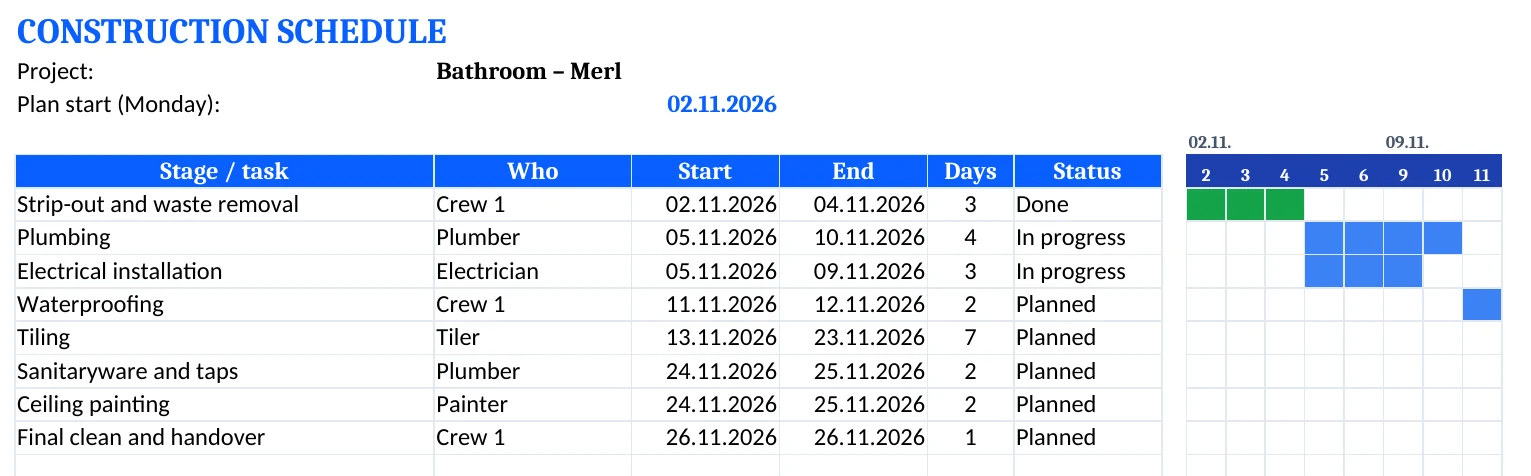
Download Excel (.xlsx) Excel sheet with Gantt chart · 12 weeks · 30 rows
In AdBooks the whole team sees the schedule.
Calendar and planner by worker and project stage, with tasks, notes and sync with Google, Outlook and Apple Calendar.
- ✓ 14 days free
- ✓ No credit card
- ✓ Sign up with Google too
What to include
How to build a good construction schedule
- Split the job into stagesStrip-out, installations, insulation, finishing. Each stage on its own row.
- Decide who does itA crew, tradesperson or subcontractor for each stage.
- Set realistic deadlinesWith a buffer for drying, material deliveries and weather.
- Mind the orderInstallations before tiling, waterproofing before ceramics.
- Track the statusPlanned, in progress, done or late, so you see right away where things are stuck.
- Update it weeklyA schedule is only useful if it's accurate. Five minutes a week is enough.
Calendar and planner in AdBooks →
All free templates
FAQ
Frequently asked questions
It works in Excel, Google Sheets and LibreOffice. The bars colour themselves through conditional formatting.
Once you enter start and end dates, the days in between turn blue. Status “Done” colours them green and “Late” red.
Yes, you download it free with no sign-up.